Your Piano Practice Partner
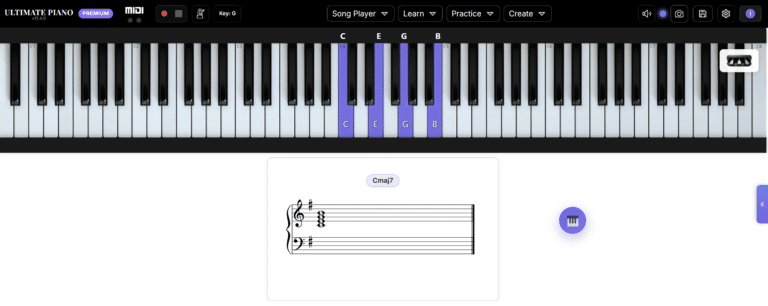
Main Application Window
The Ultimate Piano

An online MIDI piano with everything you need to practice

The Ultimate Piano is an online MIDI piano: connect your MIDI keyboard, play in your browser, and see the chords and notes behind what you play. Practise scales, chords and ear training with feedback, or play along with your own MIDI files, audio tracks, YouTube videos and scores — nothing to download.

Piano Practice

Practice Songs, Scales, Chords & Ear Training — All in Your Browser

Scale training with timing analysis, chord exercises, ear training, MIDI, Audio and YouTube player, metronome with drum grooves and much more. Everything you need to improve.

midi player

Teach & Stream

Show your Keyboard to Students, Viewers & Followers

Screenshare on Zoom, capture in OBS, or record video tutorials. Your audience sees glowing keys, chord names, note labels, and pedal — in real time, no download needed.

toggle mode

Create & Export

Professional Piano Charts — Ready to publish in Seconds

Export chord diagrams, scale charts, and keyboard graphics in high-res PNG. With finger numbers, note names, and consistent styling — one at a time or in bulk.

chord diagram generator

Testimonials

“Ultimate Piano is a no-brainer — HIGHLY recommended!”

“Ultimate Piano is a super useful tool for both piano students and piano instructors or content creators. It runs in a browser, so nothing to install AND it includes built-in sounds. For students there are tons of great exercises & options to play along with MIDI, audio or even YouTube videos, and for instructors or content creators it’s a complete (and EASY) solution for adding a light up keybed & notation to online content, with the added bonus of quick and easy keybed diagram generation & even a metronome/rhythm widget that can be integrated into a website. And at a lifetime access price this inexpensive? Ultimate Piano is a no-brainer — HIGHLY recommended!”

— Piano Tone (YouTube)

Watch the full 40-minute review on YouTube →

Also seen in the wild

Leo Brennauer uses Ultimate Piano to show the keys in his film score chord analysis.

“I Analyzed 18 Film Scores… Here Are 7 Chord Tricks I Found” on YouTube →

Ready to practice?

No account. No download.

Frequently Asked Questions

Do I need to install anything to use Ultimate Piano? +
No. Ultimate Piano runs entirely in your browser — just open the website and start playing. There is nothing to download or install. It works in Chrome, Edge, Firefox, Safari and Opera on your computer, and on tablets with touch input; phones are too small for it.
Can I play my MIDI keyboard online? +
Yes. Ultimate Piano is an online MIDI piano: connect your MIDI keyboard, open Settings → MIDI, switch on Enable MIDI and select your device, and it plays straight in your browser, sustain pedal included. MIDI works in Chrome, Edge and Opera; on iPad and Mac, the free MIDIWeb Browser passes your keyboard through. New devices are picked up automatically, with their connection status shown.
What chords and scales can I learn with Ultimate Piano? +
Learning Mode covers 31 chord types (major, minor, sevenths, sus, diminished, augmented, extended chords and more) in every inversion, plus 14 scale types: major and minor, modes such as Dorian, Lydian and Mixolydian, Harmonic and Melodic Minor, Pentatonic and Blues — all in 12 keys. Fingerings are shown for every scale and for the most common chords. To see how two chords relate, the Chord Explorer compares them: shared tones, the keys they have in common and their function in those keys.
Does Ultimate Piano have ear training? +
Yes. The ear training module covers three areas: Intervals (12 types — ascending, descending, and harmonic), Chords (8 types — block and arpeggio playback), and Scales (7 types — ascending and descending). You hear a sound, choose your answer, and get instant feedback. Your results are scored with Gold, Silver, or Bronze ratings so you can track your progress.
Can I practice along with my own songs in Ultimate Piano? +
Yes. The MIDI Player loads .mid files and shows falling notes with real-time key highlights. The Audio Player plays MP3, WAV, FLAC and other formats with independent tempo and pitch control — slow a song down without changing its key. The YouTube Player lets you load a YouTube video, set loop points and add markers. The MIDI and Audio players also detect the key and can transpose, and the Sheet Music Player follows MusicXML scores as you play.
How does the scale trainer work? +
The scale trainer shows you a scale and waits for you to play it on your MIDI keyboard. It tracks every note in real time and gives you detailed feedback: correct and wrong notes, timing consistency, velocity consistency, and your playing speed in BPM. You can practice with the right hand, left hand, or both hands simultaneously. The app automatically detects which hand is playing based on the octave range.
Is there a metronome and speed training? +
Yes. The built-in metronome runs from 20 to 400 BPM in 2/4, 3/4, 4/4, 5/4, 6/8 and 12/8, with quarter, eighth, triplet and sixteenth subdivisions. For systematic practice, Speed Training raises the tempo after a set number of bars — for example, start at 60 BPM and add 5 BPM every 4 bars. There are also drum grooves you can practice along with.
Can I see sheet music for what I play in Ultimate Piano? +
Yes. Ultimate Piano writes every note you play onto a grand staff in real time — or onto a single staff, if you prefer. It names the chord above the staff and can show its Roman numeral (I, IV, vi, etc.) in your selected key. You can place the score above, below, or beside the keyboard.
Can I record my MIDI performance in Ultimate Piano? +
Yes. The built-in MIDI recorder captures your playing — notes with velocity and your pedal — for up to 30 minutes and saves it as a standard MIDI file (.mid) that you can open in any DAW or music software.
How is Ultimate Piano different from other piano software? +
Ultimate Piano runs entirely in the browser — no download, no installation. Unlike most piano learning apps, it combines playing, learning, and creating in one tool: chord and scale training, ear training, song players for MIDI, audio, YouTube and sheet music, a metronome with speed training, real-time sheet music, MIDI recording, and a piano diagram maker. It works with your MIDI keyboard and serves streaming and content creation as well as practice.
Can I use Ultimate Piano as a streaming overlay? +
Yes. Since Ultimate Piano runs in your browser, you can add it to OBS Studio, Streamlabs, XSplit or other streaming software as a Screen Capture of the fullscreen browser. Connect your MIDI keyboard, and your viewers see every key you press highlighted in real time — with note names, chord recognition, and optional sheet music. You can customize colors and background to match your stream layout; Premium users can add their own logo via White Labeling. More on the piano overlay for streaming.
Can I create piano diagrams and screenshots with Ultimate Piano? +

Yes. The Capture feature lets you export high-resolution images of the keyboard with highlighted notes, note names, and fingering numbers. Choose from presets for Web, Print, or Social Media, with export formats PNG, JPG, or WebP at up to 4x resolution. The Diagram Generator can create complete chord charts from Roman numeral progressions (e.g., I–V–vi–IV) — ideal for teaching materials, books, or social media posts.
The Ultimate Piano - Browser piano for learning, practicing & chord diagrams | Product Hunt
The Ultimate Piano on VibeRank
Tool Cosmos
The Ultimate Piano badge